Adobe MAX 2026: New AI Features in Firefly, Photoshop and Creative Cloud
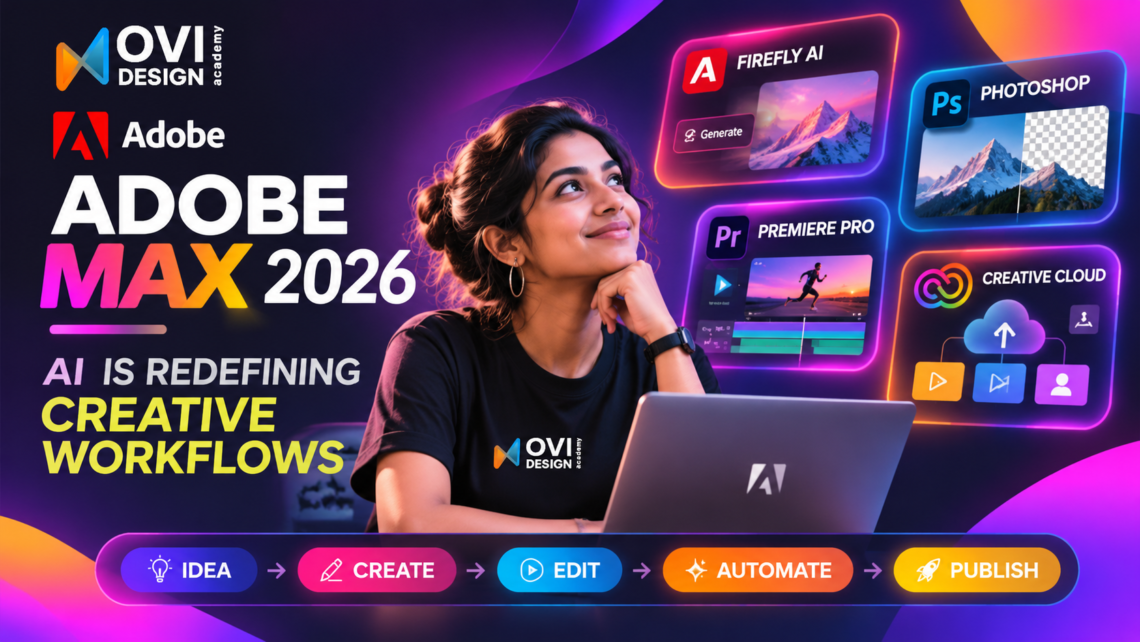
Adobe MAX 2026 brings major AI-powered updates to Adobe Firefly, Photoshop, Premiere and Creative Cloud, introducing new ways to design, edit, automate and build digital experiences.
In its November 10, 2026 announcement, Adobe introduced new creative tools, improved AI editing capabilities and expanded support for AI-assisted workflows.
Among the biggest highlights are Firefly Design, Firefly Graph, Firefly Builder, Photoshop’s new AI editing tools and Adobe Creative Agent.
These updates are particularly interesting for UX/UI designers, graphic designers, video editors and digital creators who want to explore how artificial intelligence can improve their everyday workflows.
Let’s look at what’s new in Adobe MAX 2026 and why these announcements matter for the future of design.
1. Adobe Firefly 2026: From AI Image Generation to Creative Workflows
Adobe Firefly is evolving beyond individual AI-generated images into a broader creative environment.
At Adobe MAX 2026, Adobe announced three additions to the Firefly ecosystem.
Firefly Design (Beta): Multiple Creative Formats in One Workspace
Firefly Design brings raster graphics, vector artwork, motion, 3D and print design together in a single workspace.
Instead of constantly moving between different tools, designers can explore concepts, create visual assets, collaborate and review designs in one place.
For example, a designer working on a brand campaign could develop multiple creative assets and prepare them for different formats within a more connected workflow.
Why it matters: Designers can spend less time switching between applications and more time refining their creative ideas.
Firefly Graph (Beta): Build Reusable AI Workflows
Firefly Graph allows designers to create repeatable AI-powered creative processes.
It combines AI models and Adobe tools to support customized workflows that can be adjusted and shared.
Imagine creating multiple campaign graphics that follow the same visual direction. Rather than repeating each task manually, a reusable workflow could help manage parts of that process.
Why it matters: AI is becoming useful not only for generating content but also for organizing and repeating creative production tasks.
Firefly Builder (Private Beta): Turn Ideas Into Interactive Prototypes
One of the most exciting announcements for UX/UI designers is Adobe Firefly Builder.
Firefly Builder can turn an idea into a working interactive prototype of a website, application or digital portfolio.
It combines text-based prompting with direct editing, allowing designers to explore different creative directions and refine their results.
This is an important development because designers can move beyond static visual concepts and explore how digital experiences work.
Why it matters: AI-assisted prototyping can help designers communicate ideas, experiment with interactions and validate concepts earlier.
Firefly Builder is currently in private beta, so access is limited.
2. Adobe Photoshop 2026: Smarter AI Editing With More Control
Adobe Photoshop received several updates at MAX 2026, with a focus on improving creative precision and reducing time spent on repetitive editing tasks.
Here are some of the key features.
Relight
Relight allows users to introduce and adjust light sources within an image.
Designers can modify lighting position, colour and brightness while maintaining control over the composition.
This can be useful for product photography, marketing visuals, website banners and creative campaigns.
Generative Restyle
Generative Restyle helps designers explore alternative visual styles through text prompts.
Instead of repeatedly generating a new image to achieve the desired result, users can adjust the intensity of the generated effect using a slider.
Improved Remove Tool
Photoshop’s Remove Tool can now recognize related elements surrounding an unwanted object, including shadows, reflections and other visual details.
This helps create more natural results when removing objects from an image.
Quick Compare
Quick Compare introduces an easier way to view before-and-after versions of an edit directly on the canvas.
This makes it simpler to evaluate changes without manually switching between layers.
AI Assisted Editor
Adobe also introduced an AI-first editing experience that uses natural-language instructions to perform editing tasks.
Users can switch to professional editing controls when they need more precision.
Additional Photoshop beta capabilities include Mockups, Camera Angles, Generative Recompose and Convert to Text Layers.
The biggest takeaway: Photoshop is making AI-generated edits easier to control and refine, rather than treating generated output as the final result.
3. Adobe Premiere 2026: AI-Powered Video Editing Gets More Advanced
Adobe MAX 2026 also introduced new video editing capabilities in Premiere.
The Generative Media tool brings several AI capabilities directly into the editing timeline, including:
- Generate Video
- Generate Sound Effects
- Generate Soundscape
- Generate Music
These tools can help video editors create missing footage and audio assets while continuing to work on the same project.
Adobe also introduced improvements to audio editing, including tools for separating dialogue, background music and other sounds.
Another significant update is Generative Remove (Beta), which allows editors to remove unwanted objects and background distractions from video footage.
Premiere’s Color Mode is now generally available, providing a dedicated environment for colour grading.
For video editors, content creators and digital marketers, these updates could make complex production tasks more manageable.
4. Illustrator, Lightroom and InDesign Also Get New Features
Adobe’s latest updates extend beyond Firefly, Photoshop and Premiere.
Adobe Illustrator introduces updated creative libraries with additional brushes, patterns, gradients and graphic styles. New on-canvas Blend controls make it easier to experiment with and refine vector artwork.
Adobe Lightroom adds features such as Glow and improved Blemish Removal. Open Eyes, currently in public beta, can use a reference photo to correct closed eyes in an image.
Adobe InDesign introduces Co-editing in public beta, allowing multiple designers to work on the same layout. Flex Layout and document-checking improvements also support more flexible editorial workflows.
Together, these updates aim to make creative applications more efficient while preserving control over the final result.
5. Adobe Creative Agent: A New Approach to Design Automation
Another major announcement from Adobe MAX 2026 is the expansion of Adobe Creative Agent.
Adobe is bringing AI Assistant capabilities in beta to applications including Premiere, Illustrator, InDesign, After Effects and Frame.io.
These assistants are designed to help users complete tasks through natural-language instructions.
For example, instead of manually repeating a series of production steps, a designer could describe the required task and use the assistant to help complete it.
Adobe is also previewing integrations using Model Context Protocol (MCP).
MCP integrations are intended to connect third-party AI agents with Creative Cloud applications, allowing agents to work with editable Photoshop, Illustrator, Premiere and After Effects projects.
Imagine updating a visual asset and using an AI agent to apply similar changes across multiple campaign files.
That is the type of connected workflow Adobe is developing.
Availability update: Adobe expects these MCP integrations to reach Creative Cloud customers in early 2027.
This represents a shift from AI as a standalone feature towards AI becoming part of the complete creative workflow.
6. What Do Adobe MAX 2026 Updates Mean for UX/UI Designers?
The biggest change is not simply that Adobe has introduced more AI tools.
It is that creative software is becoming more connected to prototyping, automation and product building.
Traditionally, UX/UI designers have used different tools for research, wireframing, visual design, prototyping and development handoff.
AI-assisted workflows are creating opportunities to connect more of these activities.
For UX/UI designers, the latest Adobe announcements point towards three important changes.
Faster Design Exploration
AI can help generate visual directions, produce creative assets and experiment with different approaches.
This allows designers to explore options before committing to a final direction.
More Functional Prototypes
Tools such as Firefly Builder demonstrate growing interest in converting ideas into interactive experiences.
Rather than presenting only static screens, designers can increasingly explore prototypes that demonstrate how a product behaves.
This connects with an important change in the industry: the future of UX is becoming functional, not just visual.
More Automation, More Time for Design Thinking
AI assistants can reduce some repetitive production work, potentially giving designers more time for research, user experience decisions and creative problem-solving.
However, speed alone does not guarantee a better user experience.
A useful digital product still needs clear user journeys, accessible interactions, meaningful content and usability testing.
AI can help create an interface faster. Understanding users is what makes that interface valuable.
7. What Skills Should Designers Learn After Adobe MAX 2026?
As AI becomes more integrated into design software, learning individual tools is no longer enough.
Designers need a combination of strong design fundamentals and practical AI skills.
Some important areas to focus on include:
- UX Research: Understanding user needs, problems and behaviours before designing solutions.
- UI Design and Design Systems: Creating consistent, accessible and usable interfaces.
- AI-Assisted Workflows: Using AI tools to support research, ideation, visual design and repetitive tasks.
- Interactive Prototyping: Demonstrating how a digital product behaves rather than showing only static screens.
- Product Thinking: Understanding business goals, user journeys and the decisions behind a product.
- Functional Product Building: Learning how design concepts can become testable, working digital experiences.
These capabilities also connect with the emerging role of the Design Engineer, which combines UX/UI design, product thinking and practical building skills.
The goal is not to replace design knowledge with AI.
It is to understand where AI can support the process while keeping human judgment at the centre.
For another perspective on the changing design-tool landscape, explore our article on Figma Config 2026 and its major UX/UI design updates.
8. Adobe MAX 2026: Frequently Asked Questions
What are the biggest updates from Adobe MAX 2026?
The major announcements include Firefly Design, Firefly Graph, Firefly Builder, new AI editing tools in Photoshop, generative video capabilities in Premiere and expanded Adobe Creative Agent functionality.
What is Adobe Firefly Builder?
Adobe Firefly Builder is an AI-assisted prototyping tool that can turn ideas into interactive prototypes of websites, applications and digital portfolios. It is currently in private beta.
Is Adobe Firefly Builder available to everyone?
No. Adobe announced Firefly Builder in private beta, meaning it is not yet generally available to all Creative Cloud users.
What are the new AI features in Photoshop 2026?
Some of the notable features are Relight, Generative Restyle, improvements to the Remove Tool, Quick Compare and AI Assisted Editor. Adobe also introduced several additional features in the Photoshop beta application.
What is Adobe Creative Agent?
Adobe Creative Agent is Adobe’s approach to integrating AI assistants into Creative Cloud workflows, allowing users to automate certain tasks and work with AI through natural-language instructions.
Will AI replace UX/UI designers?
AI can help automate repetitive tasks and accelerate certain parts of the design process. However, user research, accessibility, usability testing, critical thinking and product decisions still require human expertise.
Conclusion: Adobe MAX 2026 Shows the Future of Creative Workflows
Adobe MAX 2026 highlights a major direction in the creative industry.
AI is moving from individual generative features towards connected workflows that support design, editing, prototyping and automation.
With tools such as Firefly Builder, Photoshop’s improved AI editing capabilities and Adobe Creative Agent, designers are gaining new ways to develop and refine their ideas.
But these developments also highlight an important point.
The value of a designer is not determined only by how quickly they can create screens or visuals.
It comes from understanding problems, making thoughtful decisions and creating experiences that work for real people.
The future of design is not simply about using AI tools. It is about combining design thinking, creativity and technology to build better digital experiences.
Learn UX/UI Design With AI at Ovi Design Academy
At Ovi Design Academy, Chennai, we believe designers should understand both the principles of great user experience and the technologies shaping modern digital products.
Our UX/UI + AI Vibe Design (Design Engineer) program combines UX research, Figma, UI design, prototyping and AI-assisted product building through practical learning.
Whether you’re beginning your design career or exploring new AI-powered workflows, building strong design fundamentals alongside modern tools can help you prepare for the changing industry.
Don’t Just Design. Build the Future.
Explore Ovi Design Academy | Book a Free Demo Class
Sources and References
Adobe Official Announcement — November 10, 2026
Explore New Ways to Create Across Creative Cloud and Adobe Firefly
Video Reference