From designing screens to defining how a product should work.
For years, UX designers have used Figma to create wireframes, user flows, UI designs, and prototypes. But one important question often remains unanswered:
Who documents the product’s requirements, business logic, functional behaviour, and technical context before development begins?
This is where Figma’s new Specs feature becomes interesting.
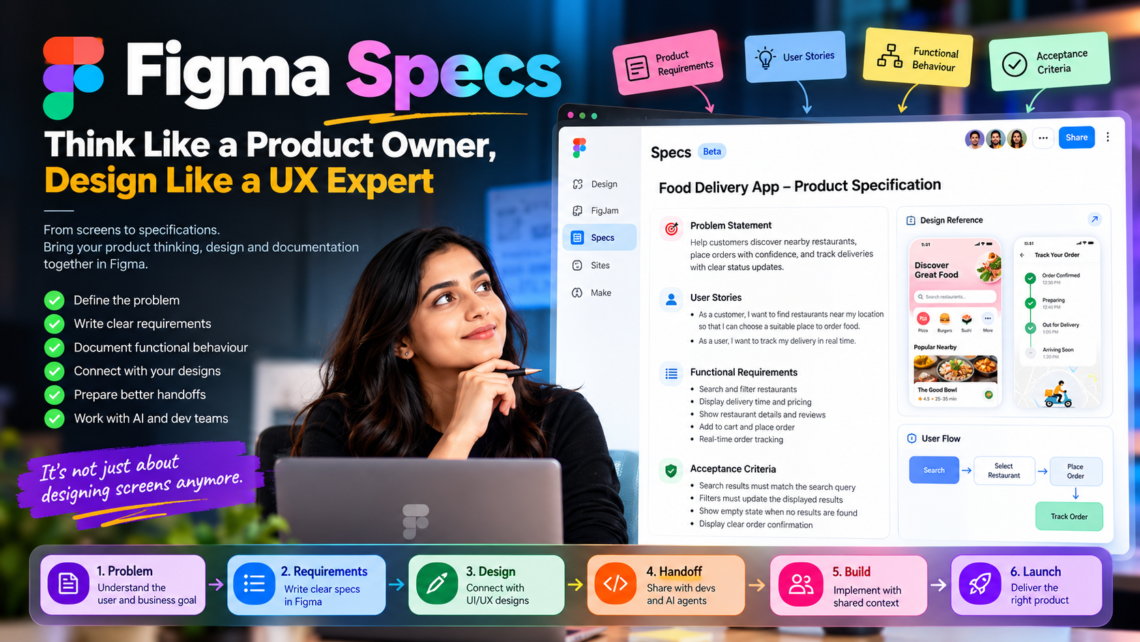
Introduced at Figma’s Config India 2026 announcements, Specs provides a shared space to bring written requirements, design explorations, diagrams, code, and project decisions together on the Figma canvas. It is designed to help teams and AI agents work with the same context as they move from an idea towards implementation. Read the official announcement.
What is Figma Specs?
Think of Specs as a collaborative workspace for documenting the thinking behind your product.
Instead of keeping requirements in a separate document, user flows in FigJam, UI designs in Figma, and technical details somewhere else, you can bring these materials together in one place.
With Specs, you can:
- Create and edit structured Markdown documents.
- Embed Figma frames, diagrams, and other canvas content.
- Bring existing Markdown files into Figma.
- Collaborate with teammates through comments.
- Use the Figma agent to draft, expand, and refine specifications.
- Share project context with compatible coding agents through Figma’s MCP integration.
Specs can live independently or alongside your designs on the Figma canvas. It is currently rolling out in open beta, so availability may vary by account and plan. Official Figma guide.
Why should UX designers care?
Because designing an interface is only one part of building a successful product.
Imagine you are designing a mobile banking application.
You create a beautiful dashboard, a transfer-money screen, and a transaction history page. But have you documented what happens when the account has insufficient funds? What happens when a transfer fails? What confirmation should the user receive? What business rules govern the transaction?
These questions cannot be answered by visual design alone.
A good specification connects the user problem, business requirements, interface, and expected behaviour.
This is where a UX designer starts thinking like a Product Owner.
1. Start with the problem, not the screen
Before opening Figma, define what you are trying to solve.
Ask yourself:
- Who is the target user?
- What problem are they experiencing?
- Why does this problem matter to the business?
- What outcome should the product deliver?
- How will we measure success?
For example, instead of writing, “Design a food delivery app,” define the objective as:
“Help customers discover nearby restaurants, place orders with confidence, and track deliveries with clear status updates.”
That statement gives the team a problem to solve rather than simply a screen to create.
2. Write the product requirements in Specs
A useful product specification should explain the expected experience before development begins.
For a food delivery application, you might document:
Feature: Restaurant discovery
User story: As a customer, I want to find restaurants near my location so that I can choose a suitable place to order food.
Functional requirements:
- Display available restaurants.
- Allow users to search by restaurant or cuisine.
- Provide filters for cuisine, rating, and delivery time.
- Display estimated delivery times and relevant pricing.
- Show an appropriate empty state when no restaurants match the search.
Acceptance criteria:
- Search results must match the search query.
- Applying a filter must update the displayed results.
- If no results are found, the interface must explain the situation and provide a way to modify the search.
Now your design has a clear purpose, defined behaviour, and measurable conditions for success.
3. Connect specifications with visual design
One of the most useful aspects of Specs is its relationship with the Figma canvas.
You can keep written decisions beside the designs they explain, rather than relying entirely on screenshots, disconnected links, or separate documents.
This makes it easier for designers, product managers, developers, and other stakeholders to understand why a particular interface exists and how it should behave.
A design frame explains what the interface looks like.
A specification explains what it is intended to do, why it matters, and what rules it must follow.
Together, they provide a stronger foundation for implementation.
4. Use AI to develop the specification
Specs also supports collaboration with Figma’s agent, which can help turn rough ideas and existing project context into more structured documentation.
For example, you could start with a product brief and ask the agent to expand it into requirements, or use design critiques and existing canvas materials to inform a specification.
Here is a prompt you can adapt:
Prompt: Create a product specification
“Act as an experienced Product Owner and UX Designer. Based on the product brief and designs provided, create a structured product specification.
Include:
- Problem statement and business objectives
- Target users and user needs
- Core features and user stories
- Functional requirements
- User flows and interaction behaviour
- Error, loading, empty, and success states
- Accessibility considerations
- Acceptance criteria
- Dependencies and technical assumptions
- Success metrics
Separate confirmed requirements from assumptions and open questions. Do not invent business rules or technical constraints that have not been provided.”
The objective is not to let AI make every product decision. It is to use AI to organize information, identify gaps, and accelerate collaboration while the team validates the result.
5. Prepare better handoffs for developers and AI coding agents
A design handoff should communicate more than colours, spacing, typography, and component specifications.
It should also explain the intended behaviour, data requirements, business rules, and important edge cases.
Specs can help package this context for compatible coding agents through Figma’s MCP server. Teams can also use specifications to guide code-backed prototyping workflows.
This creates a more connected process:
Product idea → Requirements → UX design → Functional prototype → Implementation
The important point is that the process becomes more collaborative. Designers and developers can work from shared context instead of trying to reconstruct the original intent from visual screens alone.
Specs does not automatically guarantee a correct implementation; the requirements still need to be reviewed, tested, and refined.
6. A practical workflow for UX designers
Here is how I would introduce Specs into a product design project at Ovi Design Academy.
Step 1 — Define: Identify the user problem, business objective, and expected outcome.
Step 2 — Research: Collect user insights, competitor findings, and supporting evidence.
Step 3 — Specify: Document features, user stories, functional rules, and acceptance criteria.
Step 4 — Design: Create user flows, wireframes, UI screens, and prototypes.
Step 5 — Validate: Review the requirements and test whether the proposed experience addresses the problem.
Step 6 — Build: Share the agreed context with developers or compatible AI coding agents.
Step 7 — Evaluate: Test the implementation against the original requirements and refine where necessary.
This workflow encourages designers to consider the complete product experience rather than focusing only on the visual output.
The bigger lesson: Think like a Product Owner
Learning Figma is valuable. Understanding design systems, interaction patterns, usability, and visual hierarchy is essential.
But experienced product designers also understand the reasoning behind their decisions.
They know what problem they are solving, what the business needs, how users will interact with the product, what could go wrong, and how success will be measured.
Figma Specs provides another way to bring that thinking into the design workflow.
My takeaway: Don’t just design the interface. Define the experience, document the intent, validate the behaviour, and help the team build the right product.
At Ovi Design Academy, this is the mindset we want aspiring designers to develop as AI reshapes the relationship between design and development.
A question for UX designers: Are you still handing over screens, or are you documenting the complete product experience?
#Figma #FigmaSpecs #UXDesign #ProductDesign #ProductThinking #AIinDesign #DesignEngineering